ID Age Checker
Scan a driver's license on iPhone or Android and know in seconds if the guest is old enough.
Faster, More Consistent Age Checks at the Door
Point your phone at the PDF417 barcode on the back of a U.S. driver's license or state ID. The app reads it, does the date math for you, and shows a clear pass or fail — so your doorstaff and bartenders never have to calculate birthdays on a busy night.
- Native apps for iPhone and Android
- Scans the standard AAMVA barcode found on U.S. driver licenses and state IDs
- Clear pass/fail age result, plus expired-ID detection
- Reads the barcode on the device — scan data is not uploaded or stored
- Keeps working when Wi-Fi is spotty (cached license, 72-hour offline window)
- Pro includes 5 licenses; add more any time
How It Works
- Open the app and point the camera at the barcode on the back of the ID.
- The app decodes the date of birth and expiration date on the phone.
- You see a plain pass/fail result and move on to the next guest.
The scan is an aid to your staff's judgment, not a replacement for it. Staff should still look at the physical ID and follow your venue's and your state's rules.
Built for a Busy Door
Fast
One scan replaces squinting at dates and counting years, so lines keep moving.
Consistent
Every employee gets the same answer, whether it's their first shift or their five-hundredth.
Reliable
Bars aren't known for great signal. A cached license keeps scanning running through short outages, and a grace period means you're never locked out mid-shift.
See It in Action
Sample IDs shown — no real guest data.
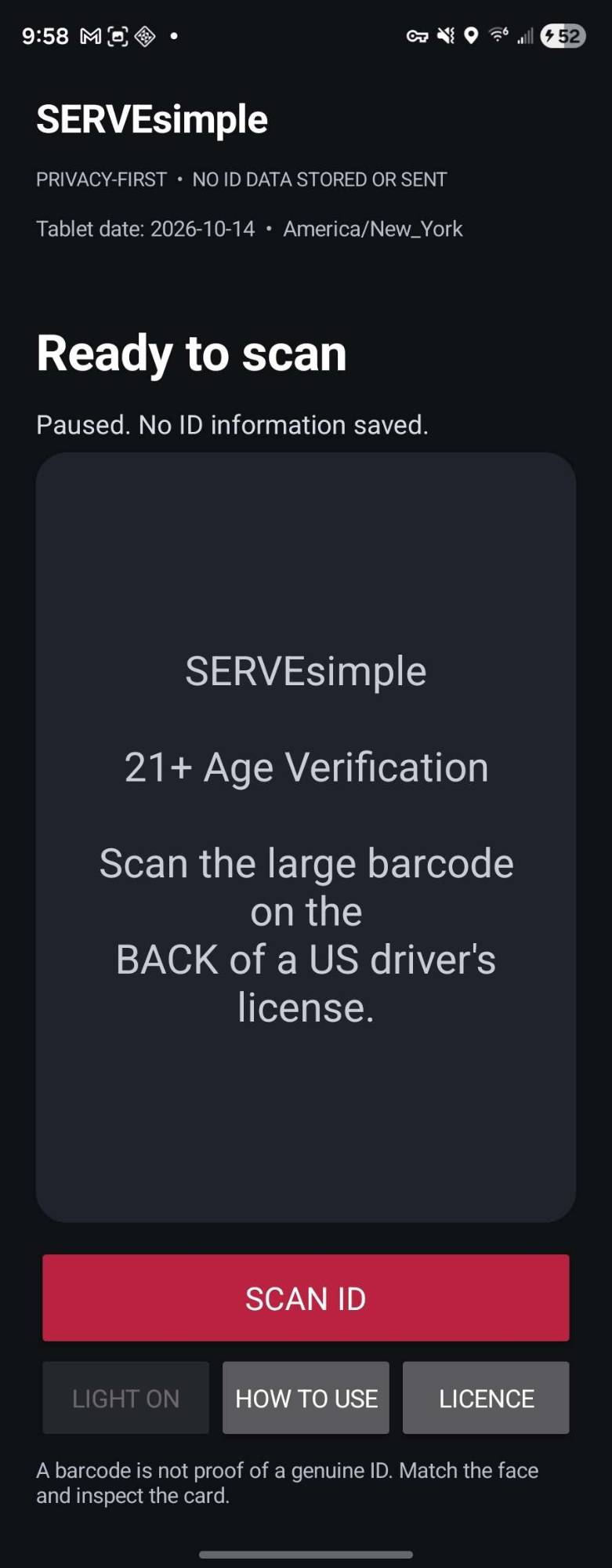
One big Scan ID button. Nothing is stored between scans.
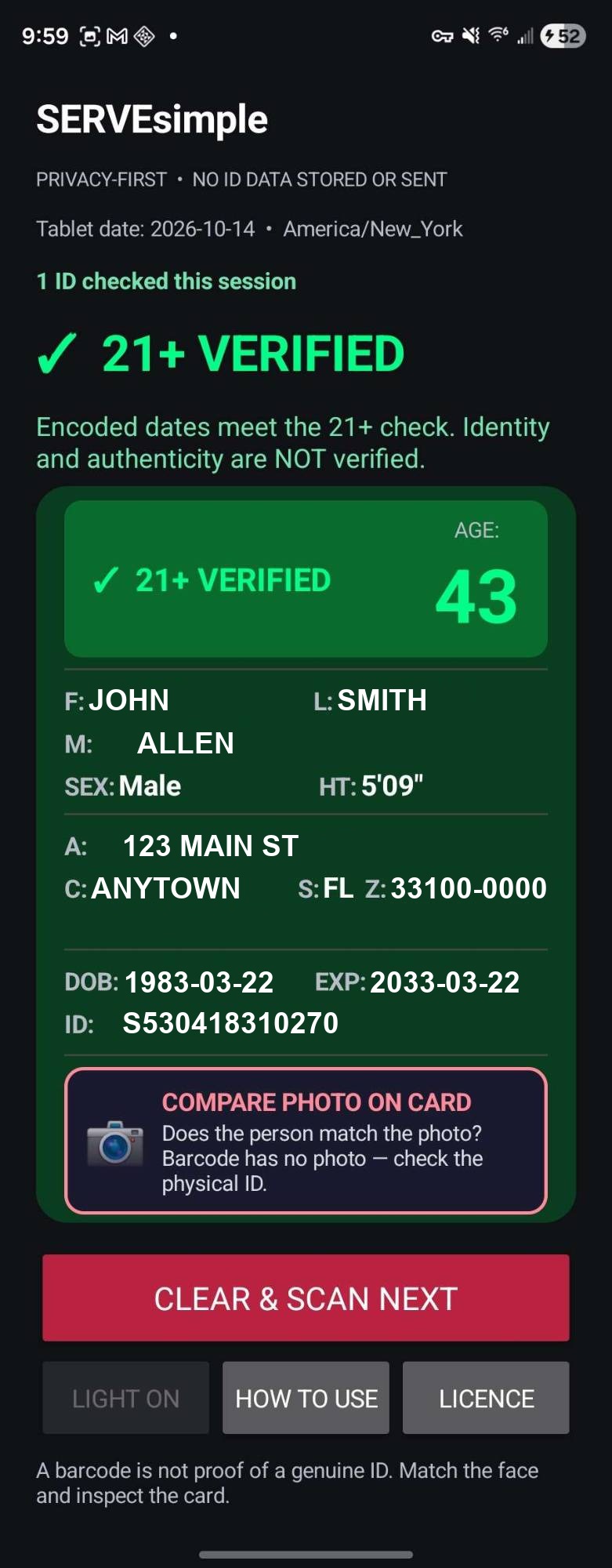
A clear green result as soon as the barcode is read.
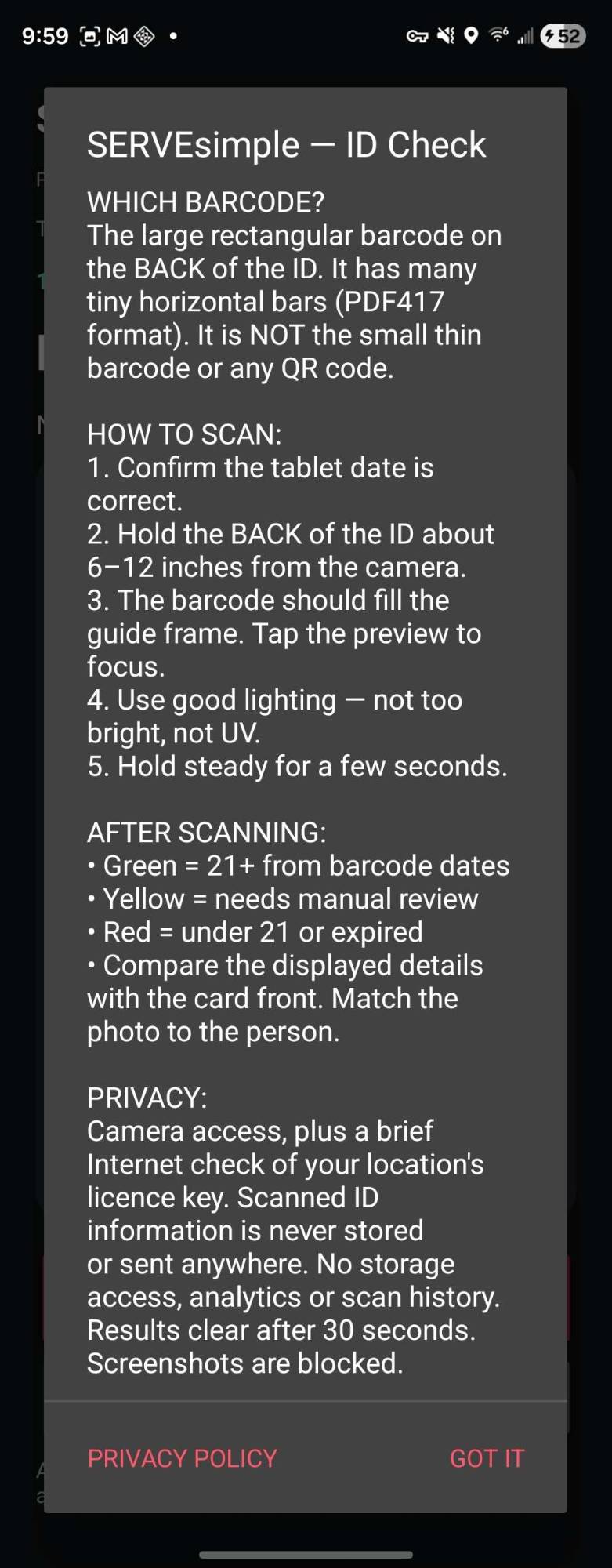
A quick on-screen guide keeps new staff scanning correctly.
Phone App vs. Hardware Readers vs. Checking by Eye
Why venues are moving age checks onto the phones their staff already carry.
| SERVEsimple ID Age Checker | Dedicated ID reader hardware | Checking by eye | |
|---|---|---|---|
| Upfront hardware | None — uses phones you already have | Devices to buy, charge, and replace | None |
| Pricing | Flat monthly price, no per-scan fees | Purchase price plus any service plan | Free, but costly when it goes wrong |
| Does the age math | Yes — reads the barcode | Yes | Staff calculate it |
| Flags expired IDs | Yes | Typically | Easy to miss |
| Consistent result for every employee | Yes | Yes | Varies by person and by how busy it is |
| Guest data | Read on the phone; not uploaded to our servers | Varies by product | N/A |
| Works at the door, bar, and patio | Any staffed phone, up to your license count | Only where a device is | Anywhere |
| Updates | Delivered through the app | Depends on the vendor | N/A |
| Part of your venue platform | Included with Pro, alongside scheduling and the staff app | Separate system | N/A |
Comparison is general; hardware features and pricing vary by product. A scan is an aid to your staff's judgment, not a replacement for it.
What You Need
Runs on the phones and tablets your staff already carry. No special hardware.
Android
- Android 8.0 or newer
- Phones and tablets
- A rear camera (required)
- Allows: camera, vibration and internet
iPhone
- iOS 16 or newer (iPhone 8, iPhone X and later)
- iPhone only. There is no iPad version yet
- The rear camera
- Allows: camera only
For the best results
- A rear camera that focuses well up close (about 4 to 8 inches). Most phones made in the last several years do.
- A flash or torch helps in dim rooms. The app can switch it on for you, and works without one.
- Internet for the license check. Scanning itself needs no connection, and a saved license keeps working through short outages.
- A phone stand at the door, so the camera stays at one distance from the ID.
Tested on: iPhone XR, Samsung Galaxy Z Fold 4, Motorola Moto G 5G (2024) and a budget Android tablet.
Camera and speed
How fast it reads depends mostly on the camera. A recent phone with an autofocus rear camera is the best choice for the door.
- Fast: a recent phone. In our tests a Samsung Galaxy Z Fold 4 read an ID in about 1 to 2 seconds, and the barcode did not need to fill the on-screen guide.
- Slower: low-cost tablets. A budget Android tablet we tested took about 3 to 8 seconds, and the barcode had to be held close so it filled the guide.
- Glare: a laminated ID can bounce the flash or a bright light straight back. If a bright spot covers the barcode, tilt the ID a little. The app also lowers the exposure or turns the light off by itself.
- Steady and even: keep the ID flat and still, with even light on it, at roughly the same distance each time.
Older or very low-end phones and tablets with weak cameras may read more slowly. Not sure about yours? Book a demo and we will check it with you.
What it reads
US driver licenses and state ID cards, using the large barcode on the back of the card.
What it does not read
Passports, military IDs, Canadian or other foreign licenses, and digital IDs shown on a phone screen. Check these by eye.
Included With the Pro Plan
The ID Age Checker comes with the Pro plan, including 5 licenses (one per device) for your location.
On another plan, or need more devices? Get 5 ID reader licenses for $35/month, and add more for $5/month per additional license.
Book a Demo Buy in the ShopRelated Features
Explore more tools that work together